

Overview Where You Are One Platform The Till What's Next Why Odoo Next Steps
Top Flight

Kauri Museum

One System for the Museum, the Shop, and What Comes Next

Taking your business further.

Top Flight Consulting Services  ·  David Scott  ·  July 2026

What Today Is About

Setting the Scene

This isn’t the full scoping exercise — that comes next. Today is about giving you enough to be confident Odoo is the right direction for the museum and the shop.

💬

A conversation, not a pitch

The deck guides us, but this is a working session. Ask questions, push back, and tell us how the museum does it today — your feedback shapes the solution.

Confirming the fit

Enough of the POS, stock and consignment to show Odoo suits how the museum actually runs — not an exhaustive feature tour.

🧭

Enough for an informed decision

The aim is to give you what you need to weigh Odoo properly and move forward with confidence — so a good call can come quickly, not after months.

🤝

Top Flight, your partner

Whatever the pace, we’re alongside you the whole way — from first look through to a phased, controlled rollout.

Where You Are Today

What We Heard · Good Systems, Held Together by Hand

Accredo’s inventory has served the museum well since 2002 — but it’s tied to a server that has to go, and everything around it is stitched together manually. Here’s what we heard.

Today — Separate Systems, Held Together by Hand

%%{init: {"flowchart": {"nodeSpacing": 34, "rankSpacing": 55, "padding": 16}}}%% flowchart TB ACC["Accredo — POS, inventory, ledger
on a 2012 server that must retire"] SHOP["Shopify — online store
~$75/mo"] -.->|products, stock re-keyed by hand| ACC ZOHO["Zoho CRM — ~$200/mo
passes as one-off lines"] -.->|no real link| ACC CAFE["Cafe — Ideal POS 7
same entity"] -.->|weekly sales summary keyed in| ACC ACC --> P1["Duplicated product codes
consignment mixed into own stock"] ACC --> P2["Reversals hard to unwind
year-end stocktake by hand"] ACC --> P3["No customer database
marketing near zero"] style ACC fill:#D0C8F0,stroke:#231B53,stroke-width:3px style SHOP fill:#fff,stroke:#666680,stroke-width:1.5px,stroke-dasharray:5 3 style ZOHO fill:#fff,stroke:#666680,stroke-width:1.5px,stroke-dasharray:5 3 style CAFE fill:#fff,stroke:#666680,stroke-width:1.5px,stroke-dasharray:5 3 style P1 fill:#F6EAF0,stroke:#B07AAF,stroke-width:2px style P2 fill:#F6EAF0,stroke:#B07AAF,stroke-width:2px style P3 fill:#F6EAF0,stroke:#B07AAF,stroke-width:2px

One platform closes those gaps: the server goes, the subscriptions fold in, and there’s no manual push to keep three systems in step. Here’s what that looks like.

One Platform, Configured to You

One Odoo Database — Every Module Plugs Into the Same Records

Catalogue

🏷️ Products & Variants

VariantsRich imagesSupplier codes
The till

🛒 Point of Sale

Touch / barcodeLoyalty & discountsUpselle-ReceiptsOffline
Buying

📦 Purchasing

OCR vendor billsPO → receipt → invoice
One Odoo Database
products · stock · customers · ledger — read & written by every module
Behind the counter

📦 Stock & Consignment

Live stockConsignment by ownerMobile counts
The books

📊 Accounting

Real-time GLAudit trailNZ GST
Marketing base

👤 Customer Database

Captured at POSOne record

▲  every module above plugs into the same hub — no sync, no re-keying  ▼

Later phase The growth ring — plugs into the same hub
Memberships & subscriptions Email marketing & loyalty Events & ticketing Cafe POS Website & online store AI agents

Solid modules are Phase 1 — the core shop, till and books, live before the busy season. Ghosted is where you head next — each one plugging into the same database when you’re ready. Nothing is big-bang.

Point of Sale · The Counter

🛒 Point of Sale

The counter your team works at all day — quick to ring up a sale, and quietly building your customer list as it goes.
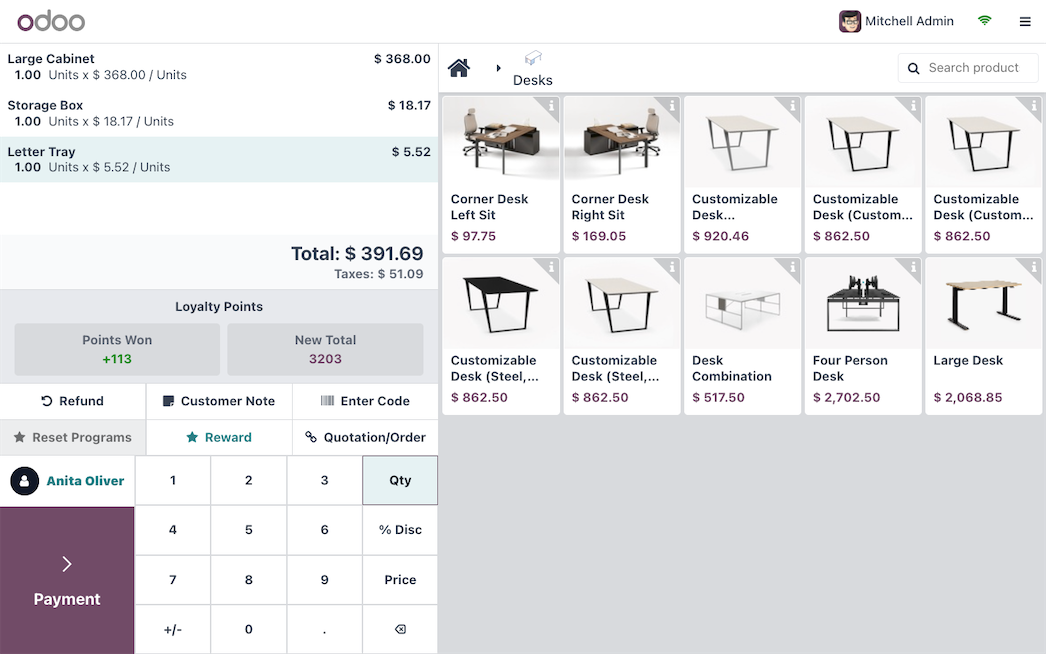
  • Touch-screen, keyboard or barcode scan — favourites for admissions and memberships, faster than the current counter
  • Account sales for tour operators — with member and AA discounts applied automatically
  • Loyalty points — reward repeat visits and gift-shop spend, redeemable right at the till
  • Upsell and cross-sell prompts — suggest a related or higher-value item at the counter, right when it counts
  • Email or WhatsApp receipts — capture a customer’s email and mobile right at the till
  • Offline mode — keeps trading through connectivity drops and syncs automatically once you’re back online
Connects to → Every sale posts to stock and the ledger in real time, and the customer lands in your database — no re-keying.
Odoo Point of Sale
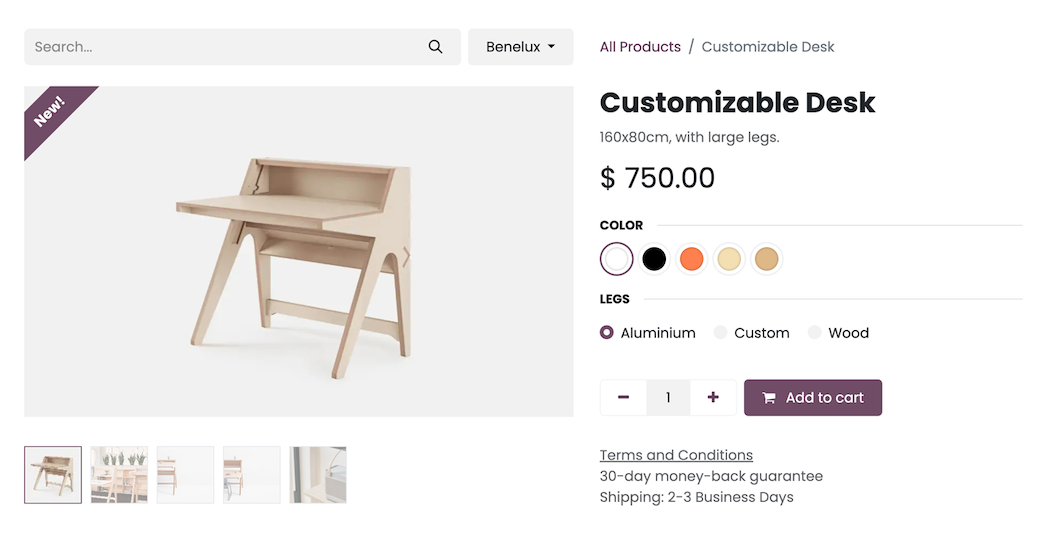
Odoo product variants — options and price
Inventory · Product Setup

🏷️ Products and Variants

Keep the Accredo-grade inventory you rely on — without the blunt, duplicated codes that have built up since 2002.

  • One template, many variants — bowls in S/M/L, jackets by size and colour, instead of a separate code for each
  • One product database — managed once, the same catalogue pushes to the POS and the website, so there’s nothing to key twice
  • Rich descriptions and images on every product — formatted text and photos that carry through to the POS screen and the online-shop content
  • Multiple supplier codes under one product — the same item from three or four vendors
  • Replenishment reports — see what’s running low and what to reorder at a glance
  • Cycle counts on a rolling schedule — no more keying year-end stock line by line
Connects to → Cleaner product data flows straight into the till, purchasing and reporting.

Individually-priced one-off pieces (handmade dolls, the clocks) are a modelling question we’ll settle together — noted, not glossed over.

Inventory · Consignment

🤝 Consignment, Done Properly

A big part of the shop is consignment — so it’s tracked properly, owner by owner, and kept out of the value of the stock you actually own.
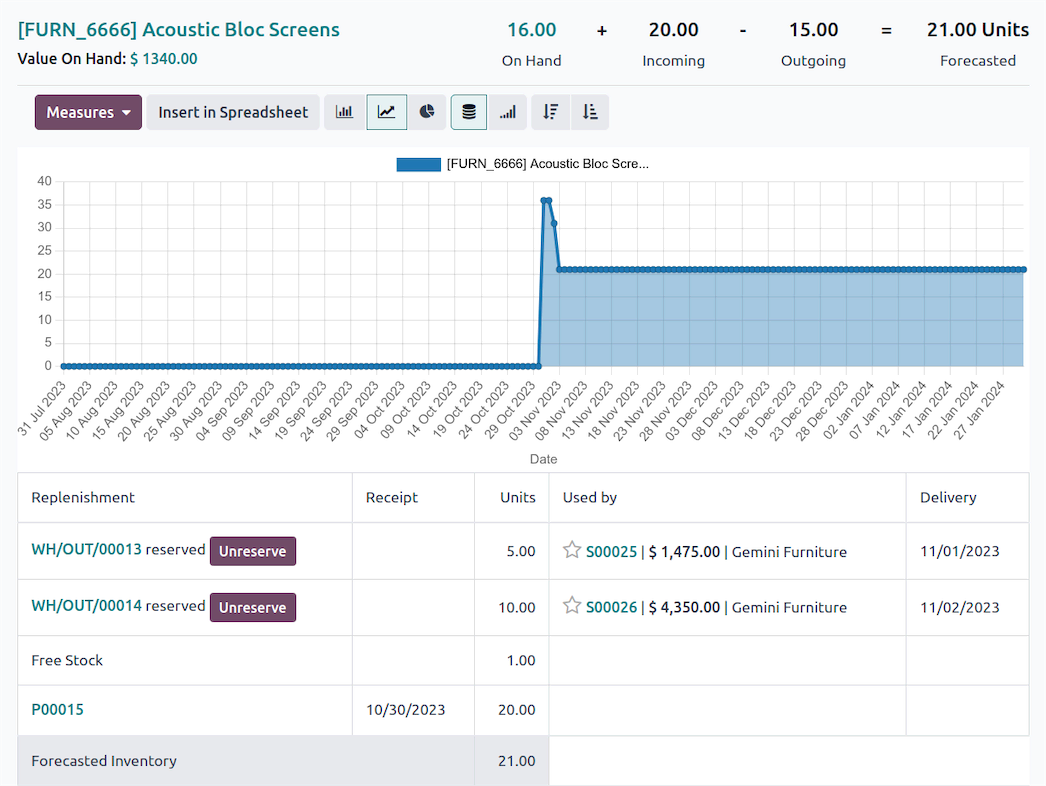
  • Capture the consignment owner at receipt — every item tagged to who it belongs to as it comes in the door
  • Consignment stock doesn’t affect your inventory valuation — it’s held, not owned, so your own stock value stays true
  • Consignment sales reported by owner — units and value at a glance, ready to raise the payment and invoice
  • Pay the supplier on sale, not on receipt
  • Mobile app for stock counts — scan or count from a phone or tablet right on the floor
Connects to → Sits on the same product and POS setup — no separate consignment spreadsheet to keep in step.
Odoo Inventory — stock value and who it’s reserved for
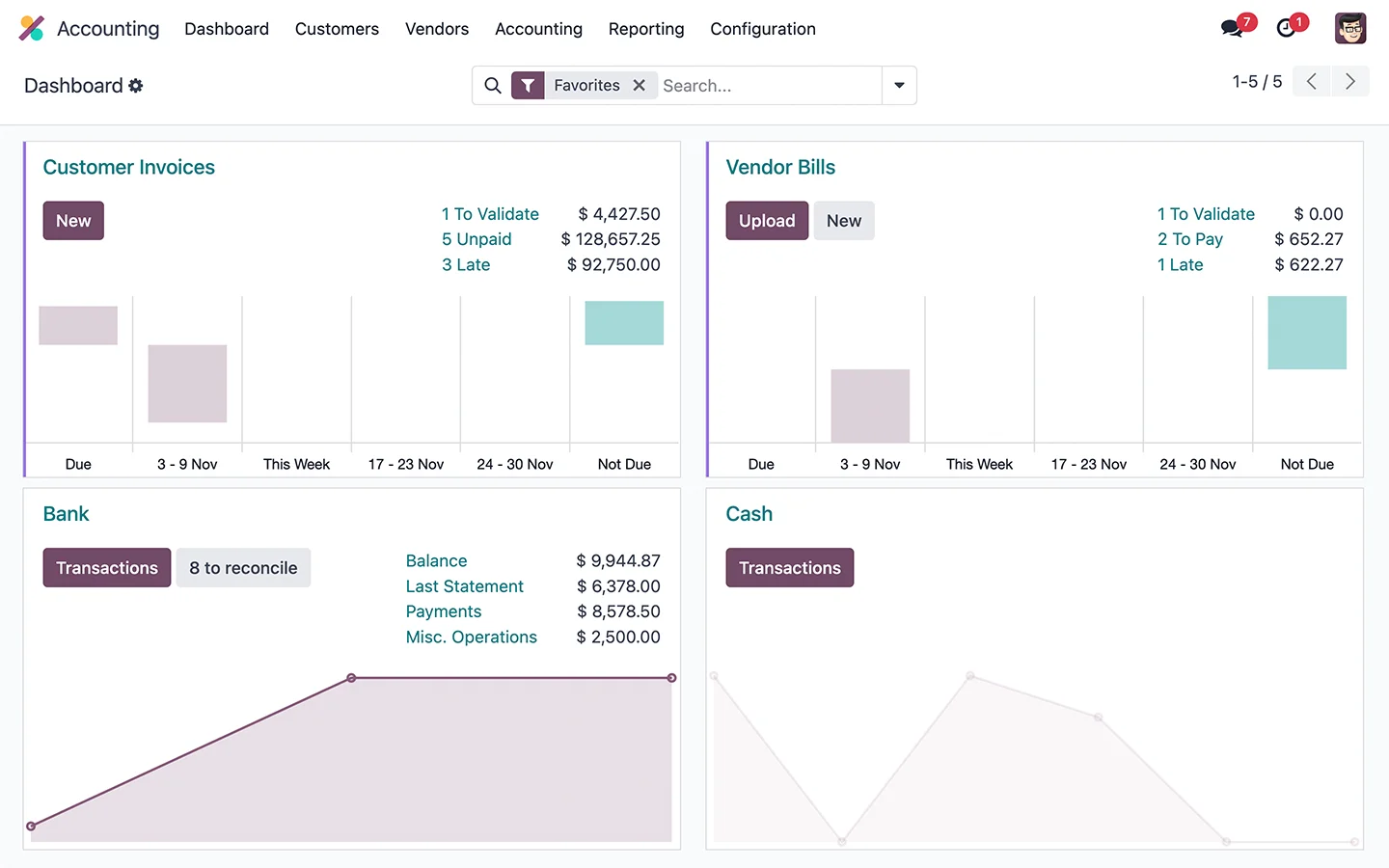
Odoo Accounting dashboard
Finance · The Ledger

📊 Real-Time Accounts

The accounts update as you trade — and corrections stop being a fight.

  • Real-time GL and P&L — no month-end roll-over to wait on
  • Full audit trail and reset-to-draft — the Accredo reversals that were “hard to unwind” become straightforward
  • Period lock and backdating controls — clean lines for your auditors
  • OCR vendor bills — email a supplier PDF and Odoo drafts the payable for you to check
  • Receive before you invoice — PO, receipt and bill as separate steps, matching how you already work; NZ GST built in
Connects to → POS, purchasing and stock all post here automatically — one set of books, always current.

Where Odoo Takes You Next

Turn On As You’re Ready · No Big-Bang

Phase one settles the core — shop, till and books — before the busy season. After that, the same platform grows with you, one module at a time. This is the direction of travel, not day-one scope.

🎟️Later phase

Memberships as subscriptions

Annual — and new monthly — passes that renew automatically, with opt-out. Turns one-off passes into the perpetuity income you don’t have today.

📧Later phase

Email marketing & loyalty

Campaigns, gift cards and member rewards off the database you start building at the till. Drops Zoho, and finally gives the marketing something to work with.

🎟Later phase

Events & ticketing

Sell exhibition and seminar tickets online and at the counter, with registration and check-in tied to the same customers.

Later phase

The cafe on one system

Restaurant POS with kitchen and coffee printing, on the same books — ending the weekly manual summary. Same legal entity, so no extra company to run.

🌐Later phase

Website & online store

A full website and shop on Odoo — museum pages, exhibitions and opening hours alongside an online store that shares one catalogue, stock and customers with the till. Drop Shopify and the manual sync that comes with it.

🤖Later phase

AI agents inside Odoo

AI agents that work right within the Odoo application — ask in plain language for a report or an insight from your own data, and get it back without building a query.

Sequencing to confirm: the cafe came up as a real priority — whether it lands inside phase one or as a fast follow is one of the first things we’ll agree together.

More Than a Replacement

Where You Are Today vs. Odoo

Grouped the way the shop actually runs — from the stockroom, to the till, into the books, across one platform. Tap a section to open it.

Product variants & supplier codes
TodayA separate blunt code for every size and colour, duplicated across three or four suppliers since 2002.
✓ With OdooOne product template with variants, and multiple supplier codes and costs under it.
Reordering
TodayReordering from memory and spreadsheets.
✓ With OdooReplenishment reports flag what’s running low and what to buy.
Consignment
TodayMixed into own stock in a consignment group — hard to value and pay accurately.
✓ With OdooOwner captured at receipt, held apart from your own stock and value, with sales-by-owner reporting and pay-on-sale.
Stocktake
TodayA year-end count keyed in line by line.
✓ With OdooRolling cycle counts on a schedule, counted from a phone on the floor — the full count stays optional.
Speed & offline
TodayA slow POS that holds up the counter queue, especially on single admissions.
✓ With OdooA fast touch, keyboard or barcode till that runs offline and syncs on reconnect.
Customer capture
TodayNo database; marketing discipline “almost non-existent.”
✓ With OdooEmail/WhatsApp receipts build a customer database at the till.
Loyalty & discounts
TodayMember and association discounts applied by hand; no loyalty scheme.
✓ With OdooMember, AA and tour discounts applied automatically, plus loyalty points and upsell/cross-sell prompts.
General ledger
TodayUpdated after the fact; reversals are “bloody hard to unwind.”
✓ With OdooReal-time GL with a full audit trail, reset-to-draft and NZ GST built in.
Vendor bills
TodaySupplier invoices keyed in by hand.
✓ With OdooOCR drafts the payable from an emailed PDF, and goods are received before they’re invoiced.
Subscriptions & cost
TodayAccredo, plus Shopify (~$75) and Zoho (~$200), plus smaller tools — “death by a thousand cuts.”
✓ With OdooOne platform, modules on as needed, with no per-module fee.
Memberships & renewals
TodayAnnual passes sold as one-off lines in Zoho — no renewal management, and “more than half forget.”
✓ With OdooPasses become subscription products that renew automatically — recurring income (a later phase).
The server
TodayA 2012 on-site server locked in a room upstairs that has to go.
✓ With OdooCloud, browser-based — nothing to retire, reachable from anywhere.

Next Steps

From Here to a September Start

Your Accredo setup goes back to 2002 — moving to Odoo isn’t a like-for-like lift. The work ahead is agreeing what matters most, cleansing the data, and sequencing a phased rollout that has the shop trading well before the busy season.

Tailored Demo

POS, stock and variants, and consignment — over Teams, on your real scenarios, so you can see Odoo running the way the museum actually does

Phase 1 Proposal & Indicative Pricing

A scoped proposal for the core — financials, inventory, consignment and POS, live before the busy season, with later phases mapped — and the two pricing pieces set out: the one-off implementation project and the ongoing monthly software licensing

Preparation for Data Cleansing

Get the master data and opening balances ready — product codes, debtors, creditors and stock, with Excel as the staging ground. The biggest chunk, and where a clean cutover is won

Top Flight — Taking your business further.
Top Flight